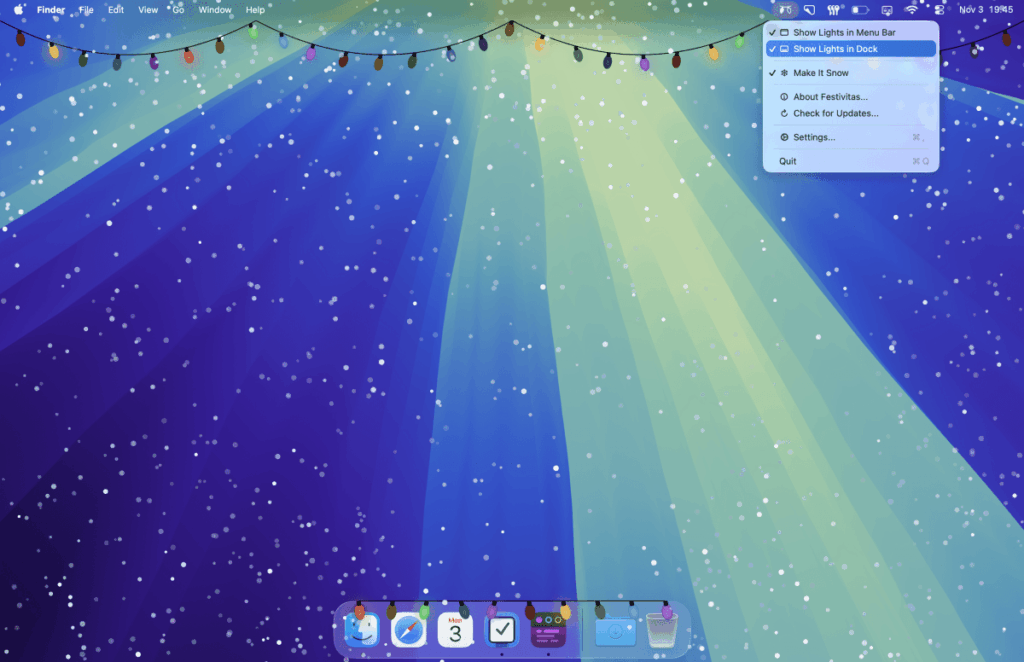
If you want to bring a bit of holiday cheer to the screen you use the most, you’ll get a kick out of the newly updated Festivitas app for Apple devices. Originally designed to add holiday lights to your Mac’s desktop, this popular indie app has been updated this year with several new features, most notably a version of the app that brings its sparkling, colorful lights to iOS devices for the first time.
With the new Festivitas app for iPhone and iPad, you can add and customize a string of holiday lights on your device’s Home Screen using iOS widgets. The lights can frame your favorite personal photo (or perhaps a holiday image you dig up on Pinterest), and you can opt to make the widget transparent so it blends in with your background.

While seasonal apps can sometimes be low-quality cash grabs, developer Simon Støvring puts genuine effort and thoughtfulness into Festivitas’ design — and doesn’t charge an arm and a leg, either. Instead, the app is available for free to consumers, with premium features that can be unlocked for a fair price of between $3.99 and $9.99. (You get to choose the price that works best for you.)
On both macOS and iOS, you can customize the holiday lights in multiple ways, beyond picking their colors and flashing pattern. You can adjust the cable’s thickness, its drop width and height, and choose from pre-made color palettes like Candy Cane, Winter Snow, Elf, and others, or you can design your own.
You can also make finer adjustments to things like the colors’ hue or temperature, the speed of the flashes, and the spacing between the lights.

Another perk is that you’ll be able to use the lights again outside of the winter holidays, as you can now change the bulb shape to designs like a bat, clover, Easter egg, heart, ghost, star, “2026,” and more throughout the year. This lets you continue to enjoy the app for other holidays and special events — there’s even a “WWDC” bulb for celebrating Apple’s Worldwide Developer Conference in June.
Another new feature this year is a snow effect for the Mac app, which adds floating snowflakes to your desktop. You can customize this experience, making the flakes gently drift down toward your dock, or increase the snow amount, fall speed, flake size, and wind, transforming it into what looks like a blizzard. You can also choose to have the snow fall on top of everything on the screen, or just on your desktop itself.

Both the snow and lights can react to your mouse as you move it across the screen, either repelling the snow or lifting and dropping the lights, for a bit of interactive fun. Plus, moving the lights up makes it easier to see your browser tabs when you need to click them, though you can turn this feature off if you prefer.
If you’re more technically inclined, you’ll appreciate the app’s Shortcuts integration that lets you automate when your lights and snow turn on. This lets you do things like trigger the snow based on the day’s forecast, or have the lights appear alongside your music, and more.

There are plenty of other apps that offer holiday themes, widgets, and icons for your iPhone, but there’s a whimsy to Festivitas that makes it worth the download for anyone who’s into Home Screen or desktop personalization.